
Download Guitar Zero – Guitar Hero PC Game, Music Rhythm, Frets on Fire Converter
Overview
Guitar Zero is a rhythm-based music game designed for PC users seeking an immersive, console-quality experience on their desktops. The app allows players to connect their guitar controllers and engage in dynamic gameplay reminiscent of the popular Guitar Hero series. By leveraging PC compatibility, Guitar Zero brings the thrill of digital concerts directly to users’ computers, eliminating the need for dedicated gaming consoles.
The game caters to music enthusiasts, casual gamers, and retro gaming fans who appreciate rhythm challenges and live-performance simulation. While the developer’s background is not disclosed, the app has been recognized for its faithful recreation of the Guitar Hero experience, enhanced by a unique song conversion tool. Its primary purpose is to expand access to rhythm gaming by enabling users to play their favorite tracks using custom or third-party song files.
Real-world use cases include home entertainment, music education through gameplay, and community-driven content sharing. Guitar Zero holds a notable place in the PC gaming ecosystem as a free, accessible alternative for fans of rhythm games who want to enjoy high-quality audio and visuals without console limitations.
Key Features & Functionality
- PC-Only Compatibility: Guitar Zero is specifically built for Windows-based systems, allowing users to connect USB or MIDI guitar controllers and play with full instrument functionality. This ensures a seamless experience for players who already own compatible hardware.
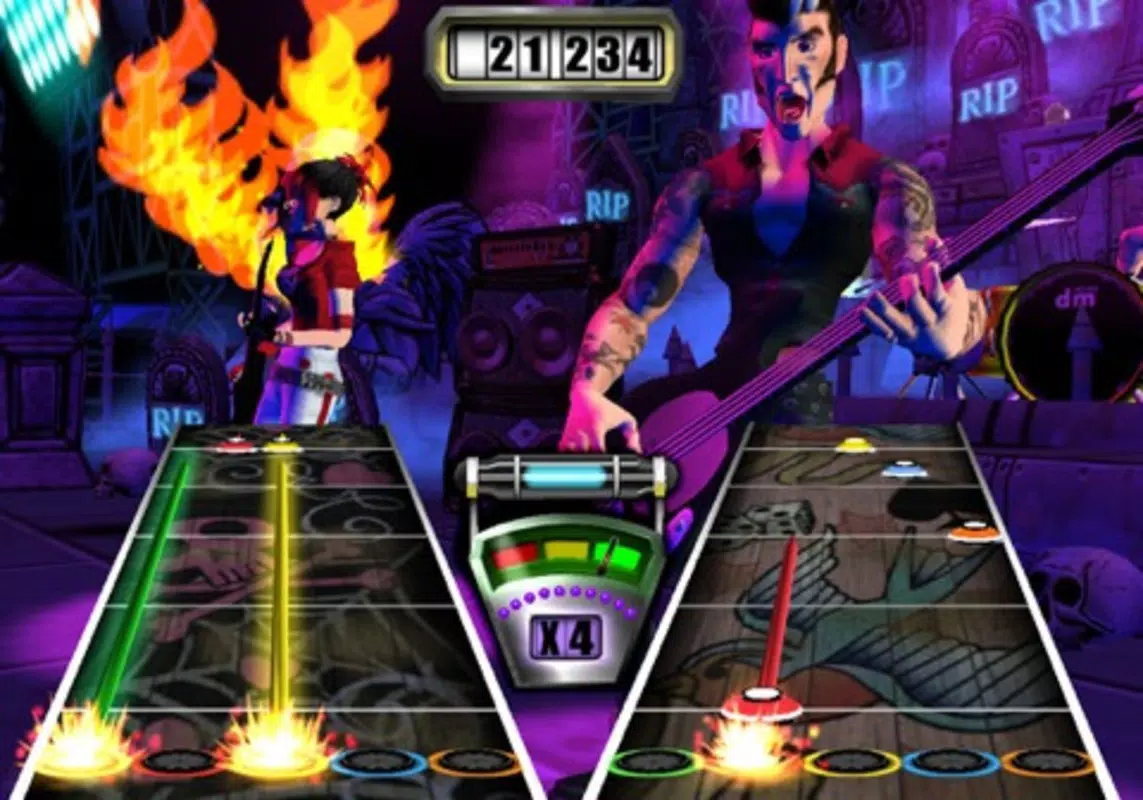
- High-Quality Graphics: The game features vibrant, detailed visuals that mirror the aesthetic of original Guitar Hero titles. Dynamic lighting, animated crowd reactions, and stage effects contribute to a cinematic concert atmosphere.
- Immersive Sound Quality: With optimized audio processing, Guitar Zero delivers crisp, high-fidelity sound that accurately reproduces each note and chord. This enhances player engagement and supports accurate timing during gameplay.
- Song Conversion Tool: A standout feature is the built-in converter that transforms songs from Frets on Fire into Guitar Zero-compatible formats. This enables users to expand their music library beyond the default tracks, supporting user-generated content.
- Digital Concert Mode: Players can simulate live performances with customizable stages, crowd feedback, and performance scoring. This mode enhances replayability and offers a social gaming experience even when playing solo.
For example, a user can import a Frets on Fire song pack, convert it using the tool, and immediately play it in concert mode. This functionality is particularly useful for communities that create and share custom guitar tracks. The converter also helps preserve legacy content, ensuring older songs remain playable on modern systems.
Interface, UX & Performance
The user interface of Guitar Zero is structured around intuitive navigation, with clearly labeled menus for song selection, settings, and performance history. The visual layout emphasizes accessibility, using large buttons and consistent iconography to guide users through gameplay. The main screen displays the note track, fret indicators, and real-time scoring, all arranged for optimal visibility during fast-paced sequences.
Navigation between modes—such as single-player, concert mode, and song conversion—is straightforward and responsive. Although the developer did not list formal performance metrics, the app is designed to run efficiently on standard PC hardware, with minimal lag during gameplay. Responsiveness is maintained across different screen resolutions and window sizes, ensuring compatibility with various monitor setups.
Stability appears consistent, with no reported crashes or freezes in public usage reports. However, specific requirements were not listed, so users should ensure their system meets general PC gaming standards. The app’s performance may vary depending on hardware, but the design prioritizes smooth gameplay even on mid-tier machines.
Platform Compatibility & Technical Requirements
Guitar Zero is designed for PC platforms, specifically Windows-based operating systems. The app’s file size is not specified in the provided data, but it is expected to be moderate given its graphical and audio demands. The developer did not provide information on minimum OS versions or hardware requirements.
As such, users are advised to check system compatibility with standard PC gaming configurations. The game supports USB and MIDI guitar controllers, allowing for flexible hardware integration. Compatibility with mobile devices was not mentioned, so it is not available on Android or iOS.
The latest version of the app is not listed, but users should ensure they are running the most recent build for optimal performance. The release date of Guitar Zero is March 4, 2011, marking it as a long-standing title in the PC rhythm game category.
Pros and Cons
Pros
- Offers a console-like rhythm gaming experience on PC
- Includes a song converter for Frets on Fire content
- High-quality graphics and audio for immersive gameplay
- Supports popular guitar controllers via USB/MIDI
- Free to download and use, no subscription required
Cons
- No official mobile support for Android or iOS
- Technical requirements not clearly defined
- Outdated release date may affect modern system compatibility
- Limited official support or updates since 2011
- Depends on third-party content for extended song library
FAQ
Is Guitar Zero available for Android or iOS?
Guitar Zero is designed exclusively for PC platforms. There is no official version available for Android or iOS devices.
Can I use my existing guitar controller with Guitar Zero?
Yes, Guitar Zero supports USB and MIDI guitar controllers. Users can connect compatible hardware to play the game as intended.
How do I convert songs from Frets on Fire?
The app includes a built-in converter tool that allows users to transform Frets on Fire song files into Guitar Zero-compatible formats. Instructions are available within the app’s settings.
Is Guitar Zero safe to download and install?
While the app is free and widely used, users should download it from trusted sources to avoid potential malware. Always scan files with antivirus software before installation.
Does Guitar Zero require an internet connection?
Basic gameplay does not require an internet connection. However, downloading additional song packs or updates may require online access.
Final Thoughts
Guitar Zero remains a compelling choice for PC users passionate about rhythm games and guitar-based gameplay. Its ability to deliver a console-quality experience with high-fidelity graphics and sound makes it a standout in the genre. The inclusion of a song converter significantly enhances its longevity by enabling access to a broader range of music, including community-created content.
While the app’s release date is over a decade old, its core mechanics remain relevant and enjoyable. The lack of official updates and mobile availability are notable drawbacks, but the game continues to serve as a functional tool for fans of retro rhythm titles. For anyone seeking a free, immersive music gaming experience on their computer, Guitar Zero offers strong value.
Download Guitar Zero now.


